Route Optimization Guide (Benefits, Algorithms, Examples + Free Tool)
Route optimization helps you find the best route across multiple stops — reducing driving time, fuel costs,
and missed deliveries. This guide explains route optimization, how it works, key constraints (time windows, capacity, multiple vehicles),
and how to optimize routes with TrackRoad.
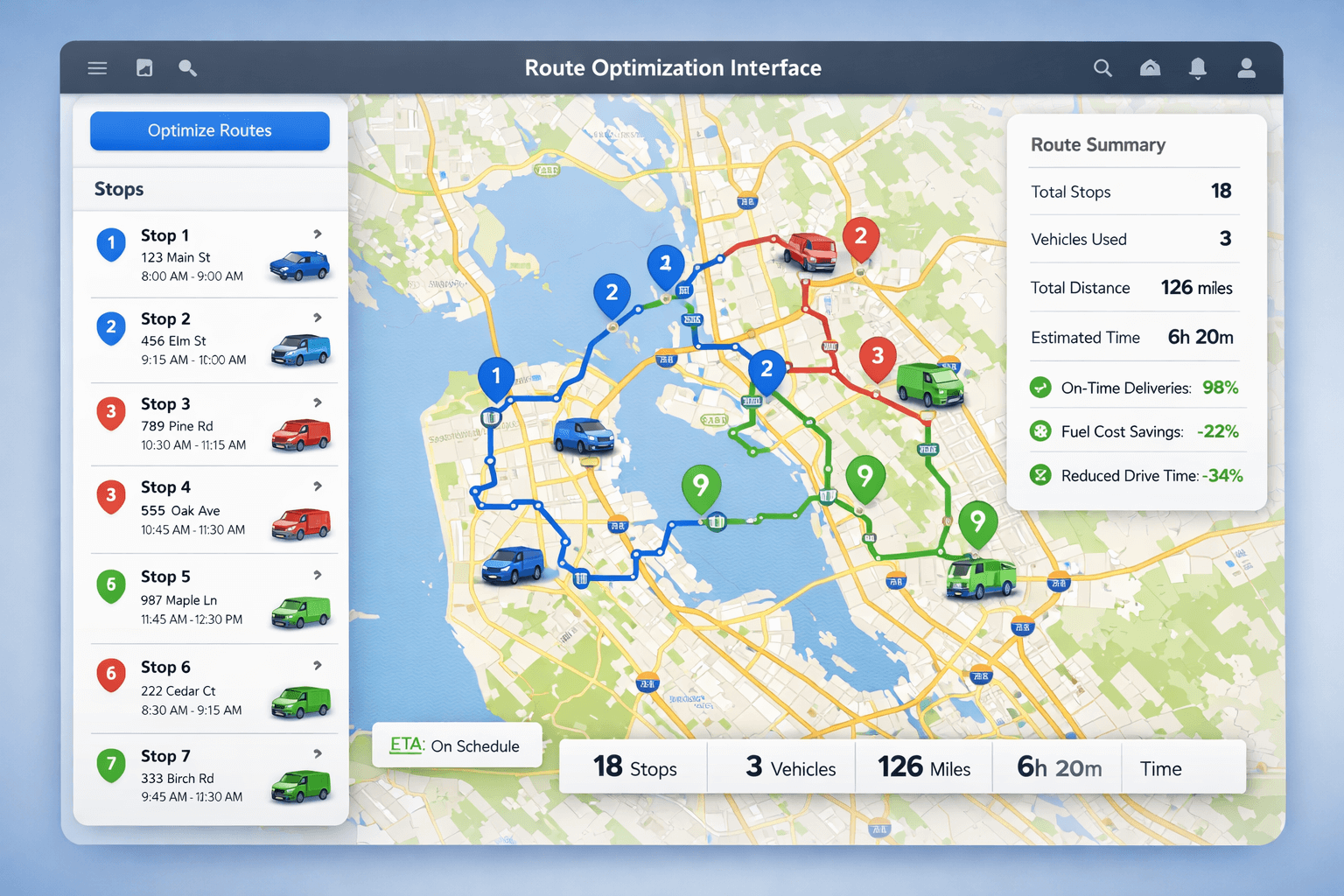 Example: route optimization with multiple vehicles and multiple stops.
What is route optimization?#
Route optimization is the process of finding the best route across multiple stops based on your goals
(minimize driving time, minimize distance, or improve on-time performance) while considering real-world constraints like
time windows,
multiple vehicles,
vehicle capacity, driver working hours, and stop service times.
Unlike basic navigation, route optimization is designed for multi-stop planning and often supports
fleet routing across multiple drivers. It is widely used by delivery companies, field service teams, and sales teams.
For a short definition (beginner-friendly), see:
What is route optimization?
Route planning vs route optimization#
These terms are often used interchangeably, but they are not the same. Route planning is “pick a route.”
Route optimization is “compute the best plan across stops, constraints, and (often) multiple vehicles.”
| Feature |
Route planning |
Route optimization |
| Stops |
Often 1–5 stops |
Designed for many stops (10–200+) |
| Stop order |
Manual or simple reorder |
Algorithmic sequencing for best results |
| Multiple vehicles |
Rare |
Assigns stops across vehicles automatically |
| Constraints |
Minimal |
Time windows, capacity, service time, shifts |
| Best for |
Single trip navigation |
Delivery, field service, sales territories |
Learn more:
Route planning vs route optimization.
Route optimization topics (hub)#
Use this page as your hub, then go deeper on each topic below:
Cost savings, on-time performance, productivity improvements.
Inputs, outputs, and what routing engines actually optimize.
The classic Vehicle Routing Problem behind modern routing systems.
Schedule deliveries and service visits within allowed time ranges.
Fleet routing across drivers with balanced workloads.
Why navigation tools are not fleet optimizers.
Practical guide for multi-stop delivery optimization.
Try TrackRoad online: import stops, add vehicles, optimize routes.
Why route optimization matters#
For most teams, routing decisions directly affect cost, speed, and customer satisfaction.
Even small improvements across many routes can create large savings.
- Reduce fuel costs: fewer miles and less idle time.
- Deliver more per day: better sequencing means fewer delays.
- Improve on-time performance: meet customer time windows more reliably.
- Lower operational stress: dispatchers spend less time manually adjusting routes.
- Better driver experience: a clear plan reduces confusion and wasted driving.
Many teams see improvements of 10–30% in distance or time, especially if they previously planned routes manually
or used only basic navigation tools.
Learn more:
Route optimization benefits.
How route optimization works#
Route optimization is like solving a puzzle: you must arrange many stops in the best order while respecting rules like time windows,
capacity, and driver hours. The more constraints you add, the more valuable route optimization software becomes.
Inputs used in route optimization
- Stops: address or latitude/longitude, stop name, optional service time.
- Time windows: when a stop can be visited (e.g., 9:00–12:00).
- Vehicle details: start/end location, working hours, capacity (weight/volume).
- Business rules: priorities, maximum route length, breaks, and more.
Outputs generated
- Optimized stop order for each route
- Estimated arrival times (ETA)
- Total distance and time
- Reports and route summaries
- Navigation-ready output for drivers
Want a step-by-step breakdown? See:
How route optimization works.
Route optimization algorithms (high-level overview)#
Behind every route optimization engine are algorithms designed to solve variations of the
Vehicle Routing Problem (VRP) — finding the best stop order
(and often stop-to-vehicle assignment) under constraints.
Because routing becomes difficult to solve exactly as the number of stops grows (especially with time windows and multiple vehicles),
most production systems use fast heuristics and metaheuristics to produce high-quality routes quickly.
Common approaches
- Genetic Algorithms — evolve candidate solutions across generations.
- Simulated Annealing — explores many variations early, then converges.
- Tabu Search — avoids local optima by blocking recent moves.
- Ant Colony Optimization — reinforces better edges over time.
If you want a practical explanation (not math-heavy), start here:
How route optimization works.
Constraints: time windows, capacity, multiple vehicles#
Real-world routing is rarely “just the shortest path.” The best route must match your operating conditions.
Modern route optimization commonly supports:
Time windows
If customers accept deliveries only between certain hours, time windows ensure routes are scheduled correctly.
Learn more:
Route optimization with time windows.
Multiple vehicles (multi-driver planning)
A multi-vehicle optimizer distributes stops across drivers and builds separate routes automatically.
Learn more:
Route optimization with multiple vehicles.
Capacity constraints (weight & volume)
Capacity-aware optimization prevents overloaded vehicles and reduces route failures.
Service time per stop
If each stop takes 5–30 minutes, include service time so ETAs and schedules stay realistic.
Example: 25 stops, 3 vehicles, 2 time windows#
Here’s a simple scenario that shows why optimization beats manual planning:
- Stops: 25 deliveries across a city
- Vehicles: 3 drivers starting from different depots
- Constraints: 8 stops must be delivered 9:00–12:00; 5 stops must be delivered 13:00–17:00
- Service time: 7 minutes per stop
A navigation tool can help reorder stops for one driver, but it won’t:
assign stops across all 3 vehicles, balance workloads, and schedule time windows in a single plan.
That’s what route optimization is built for.
For a delivery-focused walkthrough:
How to optimize delivery routes.
Use cases: delivery, field service, sales#
Route optimization for delivery companies
Reduce miles, increase stops per route, and meet customer time windows.
Learn more →
Route planning for field service teams
Schedule technicians efficiently and avoid missed appointments.
Learn more →
Route optimization for sales reps
Increase meetings per day and reduce windshield time.
Learn more →
ROI: where savings come from#
Route optimization improves the metrics that directly impact cost and customer experience:
- Fewer miles driven: lower fuel and vehicle wear.
- Less overtime: better sequencing and realistic ETAs reduce late finishes.
- Higher route density: more stops per driver per day.
- Fewer missed time windows: fewer failed deliveries and repeat visits.
Learn more:
Route optimization benefits.
Best practices (and common mistakes)#
Use accurate stop addresses or coordinates
Bad address data leads to incorrect ETAs and route inefficiency. If possible, use validated addresses or include latitude/longitude.
Include realistic service times
Plans often fail when service time is ignored. Even 5 minutes per stop becomes significant across 50+ stops.
Set correct working hours for vehicles
If drivers work 8:00–17:00, include that. Optimization becomes realistic when constraints reflect reality.
Common mistakes to avoid
- Ignoring time windows: makes the plan look good but fail in the real world.
- Underestimating service time: causes late routes and missed appointments.
- Overloading vehicles: leads to rework and route changes mid-day.
- Not re-optimizing: cancellations and new stops happen—adjust quickly.
How to optimize routes using TrackRoad#
- Add stops by typing addresses, pasting a list, or importing Excel/text files.
- Add vehicles with start locations, working hours, and optional capacity limits.
- Add constraints like time windows and service times.
- Optimize routes and review the output: route order, ETA, distance, time.
- Send to drivers using the TrackRoad mobile apps (iOS & Android).
Learn more about TrackRoad:
What is TrackRoad?
Route optimization FAQ#
Quick answers to the most common route optimization questions.
What is route optimization?
Route optimization finds the best route across multiple stops while considering constraints like time windows,
service time, vehicle capacity, and driver working hours.
What is the difference between route planning and route optimization?
Route planning is choosing a route (often manually). Route optimization uses algorithms to automatically sequence stops
and handle constraints such as time windows, capacity limits, and multiple vehicles.
How is route optimization different from Google Maps?
Google Maps can reorder stops for a single route, but route optimization software can assign stops to multiple vehicles,
apply time windows, capacity limits, service times, and optimize an entire fleet.
See:
Route optimization vs Google Maps.
Can route optimization handle multiple vehicles?
Yes. Multi-vehicle route optimization assigns stops to multiple vehicles and generates separate optimized routes,
balancing workload and respecting each vehicle’s schedule and constraints.
See:
Multiple vehicles.
Does route optimization support time windows?
What information do I need to optimize routes?
You typically need stops (addresses or coordinates), optional service times and time windows, and vehicle details like start location,
working hours, and capacity limits.
How much can route optimization save?
Savings vary, but many teams reduce total driving distance and time by 10–30%, lowering fuel costs, overtime, and missed deliveries.
Is route optimization useful for individual drivers?
Yes. Drivers visiting many locations can save time and reduce driving by optimizing stop order and schedules.
Ready to Optimize Your Routes?
Try TrackRoad route optimization online. Add stops, vehicles, time windows, and generate optimized routes instantly.
Start Route Optimization
View Pricing