Route Optimization vs Google Maps: What’s the Difference?
Google Maps is designed for navigation (directions + traffic).
Route optimization software is designed for planning (best stop order, feasible schedules,
and fleet constraints like time windows, capacity, and multiple vehicles).
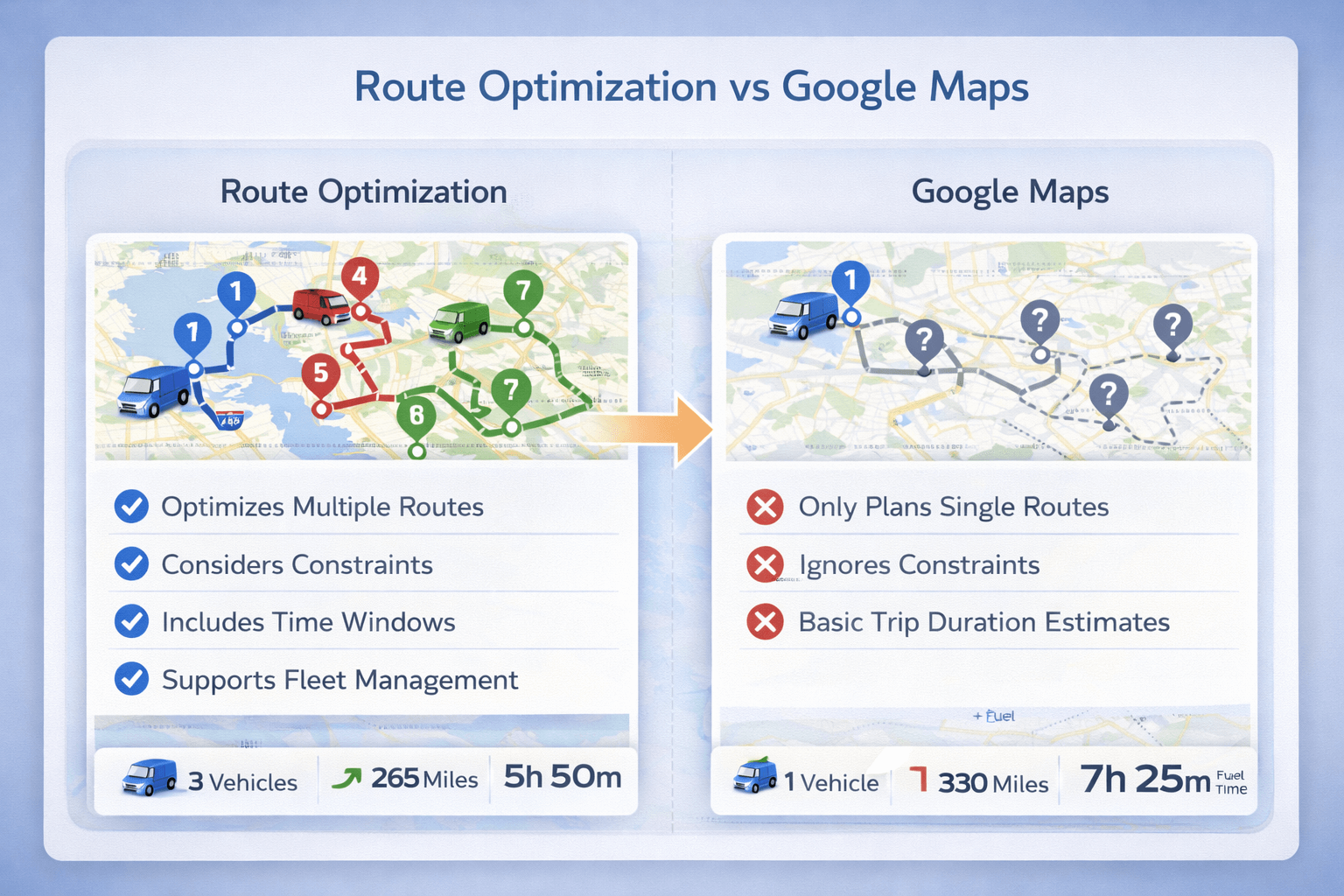 Navigation answers “how do I drive this route?” Optimization answers “what’s the best plan for all stops and drivers?”.
Google Maps focuses on navigation for one route. Route optimization plans multiple routes with real-world constraints.
Navigation answers “how do I drive this route?” Optimization answers “what’s the best plan for all stops and drivers?”.
Google Maps focuses on navigation for one route. Route optimization plans multiple routes with real-world constraints.
Quick answer: which one should you use?#
Use Google Maps when you have a small number of stops and just need directions.
Use route optimization when you have many stops, strict time windows, multiple drivers,
capacity limits, or you need dispatch-ready plans with ETAs.
If you’re new to the concept, start here:
What is route optimization?
and
How route optimization works.
What Google Maps does well#
Google Maps is a navigation-first tool. It’s excellent when the job is to guide a driver between locations.
- Turn-by-turn navigation and re-routing
- Traffic-aware ETAs for a route you already chose
- Simple multi-stop trips (small lists)
- Great driver experience on mobile
For a single driver with a handful of stops and no constraints, Google Maps can be enough.
What route optimization does differently#
Route optimization is planning-first. Instead of “how do I drive from A to B?”, it answers:
“What is the best plan for all stops and vehicles—while meeting constraints?”
- Stop order optimization across many stops
- Multi-vehicle routing (assign stops to drivers)
- Time windows and service time at stops
- Working hours (Time In / Time Out)
- Capacity constraints (weight/volume)
- Planned ETAs and route summaries for dispatch
Related deep dives:
Route optimization with time windows,
multiple vehicles,
VRP explained.
Route optimization vs Google Maps: feature comparison#
Feature comparison between Google Maps navigation and route optimization software
| Feature |
Google Maps |
Route Optimization Software |
Why it matters |
| Turn-by-turn navigation |
✅ Yes |
✅ Often via driver app / integrations |
Drivers need reliable directions in the field. |
| Traffic-aware ETA (single route) |
✅ Yes |
✅ Yes (planning ETAs) |
ETA accuracy improves customer communication. |
| Best stop order for many stops |
⚠️ Limited |
✅ Yes |
Reduces backtracking and wasted miles. |
| Time windows per stop |
❌ No |
✅ Yes |
Ensures on-time delivery/appointments. |
| Service time at each stop |
❌ No |
✅ Yes |
Prevents unrealistic schedules and broken ETAs. |
| Multiple vehicles / drivers |
❌ No |
✅ Yes |
Fleets need stop assignment + route balancing. |
| Capacity constraints (weight/volume) |
❌ No |
✅ Yes |
Prevents overloads and failed routes. |
| Working hours (driver shifts) |
❌ No |
✅ Yes |
Routes must finish within Time In/Time Out. |
| Dispatcher workflow (review + iterate) |
❌ No |
✅ Yes |
Ops teams need planning control, not just directions. |
| Route reports / analytics |
❌ No |
✅ Yes |
Measure savings and improve operations over time. |
If you want the ROI side of this comparison, see:
Route optimization benefits.
When Google Maps is enough#
- You have a small number of stops (and they don’t change much)
- No strict time windows or appointment scheduling
- No multi-vehicle planning or stop assignment
- No capacity constraints (weight/volume)
- You mainly need navigation, not dispatch planning
When you need route optimization software#
Route optimization is usually the better fit when your routes must be feasible and repeatable at scale.
- You have 10+ stops per route (or routes daily)
- You have multiple drivers/vehicles
- You have time windows or strict SLAs
- You need service time included in scheduling
- You need capacity limits (weight/volume) respected
- You want planned ETAs, reports, and workload balancing
If you’re comparing “planning” vs “optimization” broadly, this guide helps:
Route planning vs route optimization.
Try TrackRoad Route Optimization
Import stops from Excel, add vehicles and time windows, and generate optimized routes instantly.
Start Optimizing
View Pricing
Common planning mistakes (why “shortest route” fails in real life)#
- Ignoring service time: 5–10 minutes per stop compounds fast and breaks ETAs.
- Ignoring time windows: shortest-distance routes can be infeasible if customers aren’t available.
- Planning one “mega route”: fleets need stop assignment across vehicles, not just stop ordering.
- Manual ordering bias: humans often create crossing routes and extra miles.
- No capacity checks: overloads lead to mid-day route failures and rework.
Want a quick test drive?
Free route optimization tool.
FAQ#
Can Google Maps optimize a route with multiple stops?
Google Maps supports multi-stop directions and may reorder stops in some cases, but it does not support
constraints like time windows, service time, capacity limits, multiple vehicles, or workload balancing.
Why do “optimized” routes sometimes look longer than expected?
Constraints (time windows, working hours, priorities) can make the shortest-distance route infeasible.
Optimization aims for the best feasible plan, not just the shortest path.
Do I still need Google Maps if I use route optimization?
Often yes. Many teams use route optimization for planning and then navigate using a driver app or a navigation tool
for turn-by-turn directions.
What’s the best use case for route optimization?
Multi-stop delivery, field service, and sales routing where you have many stops, strict scheduling, multiple vehicles,
or constraints like capacity and working hours.
Plan Better Than “Just Directions”
If you have multiple stops, time windows, or multiple vehicles, route optimization can cut miles and improve on-time performance.
Try Route Optimization
See Benefits