How to Optimize Delivery Routes (7-Step Guide)
Delivery route optimization reduces miles, fuel spend, overtime, and late arrivals.
This guide shows how to optimize delivery routes for single drivers or fleets — including time windows,
service time, driver hours, and multiple vehicles.
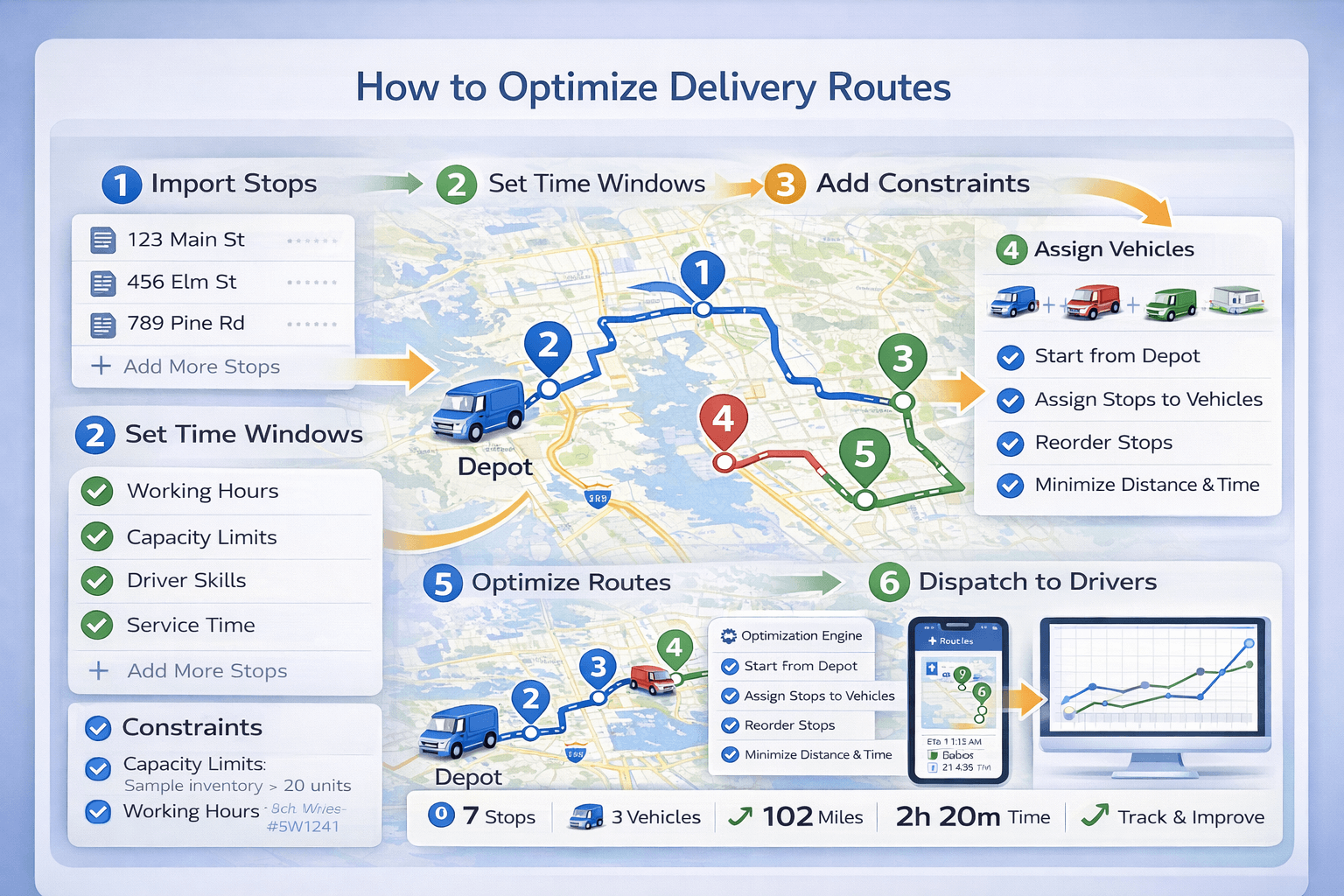 Delivery route optimization workflow: import stops, apply time windows and constraints,
assign vehicles, optimize routes, and dispatch to drivers.
Delivery route optimization workflow: import stops, apply time windows and constraints,
assign vehicles, optimize routes, and dispatch to drivers.
Optimize Delivery Routes Free
Import stops, add vehicles, set time windows, and generate optimized routes instantly with TrackRoad.
Optimize Routes Now
View Pricing
Quick answer#
The best way to optimize delivery routes is to use route optimization software that:
(1) cleans stop data,
(2) reorders stops to minimize time or distance,
(3) applies constraints like time windows and driver hours, and
(4) distributes stops across multiple vehicles when needed.
New to route optimization? Start here:
What is route optimization?
Why optimize delivery routes?#
Manual planning or “guessing” stop order usually creates extra miles, backtracking, and late deliveries.
Delivery route optimization improves operations by:
- Reducing miles driven and fuel costs
- Reducing overtime and missed delivery windows
- Increasing stops completed per route
- Improving ETA accuracy and customer satisfaction
- Helping dispatchers plan faster (minutes instead of hours)
Related:
Route optimization benefits
and
route planning vs route optimization.
Manual routing vs route optimization software#
For a small number of stops, manual routing can work. As soon as you add time windows, multiple drivers, or 20+ stops,
software-based optimization becomes the reliable option.
| Capability |
Manual / basic maps |
Route optimization |
| Best stop order for many stops |
⚠️ Hard to do consistently |
✅ Automatic |
| Time windows + scheduling |
❌ Often breaks |
✅ Built-in |
| Multiple drivers / vehicles |
❌ Manual assignment |
✅ Automatic distribution |
| Capacity limits (weight/volume) |
❌ Manual checking |
✅ Constraint-based |
| ETAs and feasibility |
⚠️ Unreliable |
✅ Realistic schedules |
Step 1: Prepare your stop list#
Start with clean data. Each stop should include at least:
- Address or GPS coordinates
- Optional: stop name / order ID
- Optional: service time (unload, signature, paperwork)
- Optional: time window (delivery appointment)
- Optional: load demand (weight/volume/pieces)
TrackRoad supports manual entry, copy/paste address lists, and Excel/text import.
Step 2: Add time windows and service time#
Time windows define when a delivery can happen (e.g., 09:00–11:00). If you don’t include them,
a route can look efficient but become impossible in real operations.
Service time is equally important. If each stop takes 5–15 minutes, ignoring it destroys ETAs and causes late routes.
Learn more:
Route optimization with time windows.
Step 3: Add vehicles and driver working hours#
For fleets, delivery optimization requires stop-to-vehicle assignment plus route sequencing.
For each driver/vehicle add:
- Vehicle/driver name
- Start location (depot or home base)
- Optional end location
- Working hours (Time In / Time Out)
Learn more:
Multi-vehicle route optimization.
Step 4: Add capacity constraints (optional)#
Capacity constraints matter when vehicles have limited load:
- Weight limits
- Volume limits
- Max stops per route (optional operational limit)
When capacity is included, the optimizer avoids overloads and spreads demand across vehicles.
Step 5: Optimize routes#
Once stops and constraints are ready, run optimization. A good optimizer will:
- Choose the best stop order
- Create feasible schedules with ETAs
- Balance workloads across vehicles
- Minimize total distance and travel time
Deep dive:
How route optimization works.
Step 6: Dispatch routes to drivers#
After optimization, routes should be sent to drivers with clear stop order and ETAs.
With TrackRoad iOS/Android apps drivers can:
- View routes and stop lists
- Navigate between stops
- Mark stops visited and update status
- Handle day-of changes with minimal dispatch disruption
Optimization improves over time when you use real execution data.
Track and adjust: service time averages, delivery window buffers, and route capacity assumptions.
Try TrackRoad Delivery Route Optimization
Import stops and optimize delivery routes instantly with time windows, multiple vehicles, and constraints.
Optimize Routes Free
View Pricing
Route optimization checklist#
- ✅ Stop list complete + validated addresses
- ✅ Time windows added (if applicable)
- ✅ Service time included
- ✅ Vehicles + working hours added
- ✅ Capacity limits added (optional)
- ✅ Optimize and review feasibility + ETAs
- ✅ Dispatch to drivers
- ✅ Track KPIs and improve assumptions
Common mistakes when optimizing delivery routes#
Ignoring service time
Service time compounds fast and is a common cause of late deliveries and broken ETAs.
Using time windows that are too strict
Very narrow windows can make routes infeasible. Wider windows improve feasibility and efficiency.
Optimizing as one “mega route” for fleets
Fleets need stop assignment across vehicles, not just stop ordering for one driver.
Not planning for exceptions
Failed deliveries, reattempts, cancellations, and new stops happen. Use re-optimization rather than manual chaos.
KPIs to measure delivery route optimization#
Measure before vs after to prove ROI:
- Miles per route and drive time per route
- Stops per driver per day
- On-time delivery rate
- Overtime hours
- Cost per stop (fuel + labor + overhead)
- Failed delivery rate and reattempt cost
Related:
Route optimization benefits.
FAQ#
What is the best way to optimize delivery routes?
Use route optimization software that can reorder stops, apply constraints like time windows and working hours,
and distribute stops across multiple vehicles when needed. Manual routing works only for a small number of stops.
How much can route optimization save delivery companies?
Many delivery operations reduce miles and drive time by 10–30% when moving from manual routing to optimization.
Savings come from fewer miles, less fuel, and reduced overtime.
Can TrackRoad optimize routes for multiple drivers?
Yes. TrackRoad can distribute stops across multiple vehicles and generate optimized routes for each driver
while respecting constraints like time windows and capacity limits.